 Calibre Reader
: questions and answers
What readers ask before they install Calibre Reader, the reader for calibre libraries on iPhone, iPad, Mac, Android, Windows and Linux.
Is Calibre Reader free?
Yes. Calibre Reader is free to download and to use, and reading itself has no limit: every book, every format, Read Aloud and your own fonts are for everyone. The free app holds two online libraries and two libraries on the device, and on iPhone, iPad and Android it shows an ad on Home and, while you are signed out, another on Friends and Clubs. Supporting the app once lifts those limits and the ads.
What does supporting the app add?
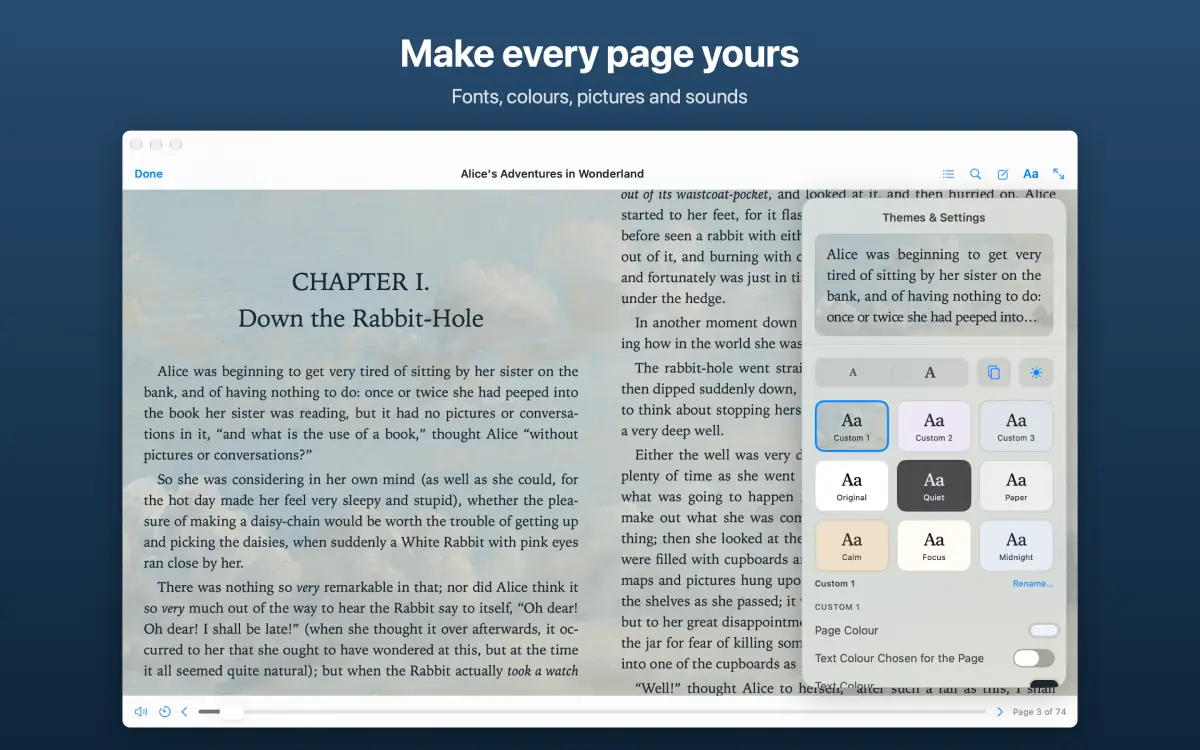
Supporter — Lifetime is a single purchase: US$8.99 in the App Store on iPhone, iPad and Mac (shown in your own currency), or US$7.99 through Stripe on Android, Windows and Linux. It brings as many libraries as you like, online and on the device, every theme made your own with pictures behind the words, your place and notes kept in step on all your devices, on iPhone, iPad and Mac fonts installed for every app, five devices signed in to your account instead of two, and no ads. Tips on top are optional thanks. Prices and refunds are on Supporting & Refunds.
Does it need a computer running calibre?
No. A calibre library in Dropbox, Google Drive, OneDrive, Box or iCloud Drive, or on a NAS over WebDAV, SMB or FTP, is read directly, with no server running. A library can also live on the device itself, imported from a calibre library, a folder or a ZIP file. Only calibre's content server needs calibre, or calibre-server, running somewhere; calibre-web is a server of its own, often on a NAS. See Libraries on clouds and NAS drives.
Which servers and libraries does it work with?
calibre-web, calibre's own content server, Kavita, Komga and any OPDS catalog; Dropbox, Google Drive, OneDrive, Box, iCloud Drive, WebDAV, SMB and FTP; and libraries on the device in calibre's own format. Several can be used at once, and All Books shows them together. Start with calibre-web on iPhone, iPad, Mac and Android, calibre's content server or Kavita, Komga and OPDS catalogs.
Which formats does it open?
EPUB, KEPUB, MOBI, AZW, AZW3, FB2 and many other e-book formats; PDF, DjVu and CHM; CBZ, CBR, CB7 and CBT comics; Word (DOCX), RTF, Pages and OpenDocument files; plain text, Markdown and HTML; and audiobooks, music and films such as M4B, MP3 and MP4. They open in the app's own readers, with nothing converted on a server. A few old formats (LIT, LRF, SNB) have no reader, and books protected by DRM do not open: Calibre Reader does not remove DRM.
Does it work offline?
Yes. Each library's catalog is kept on the device, and a book you open or download stays there until you delete its download. Libraries on the device need no connection at all.
Is my library private?
Your books stay on your devices and your own servers. Passwords are kept in the device's Keychain (on Android, encrypted with a key the Android Keystore holds) and sent only to the server they belong to, and certificates are checked for servers on the internet. Apart from Google's ads, and on Android the figures Google's ML Kit sends Google, the app has no analytics. A Calibre Reader account is optional: it is needed for friends, clubs and chats, lending, the Daily Quiz, sending books to your other devices, editing together and keeping places and notes in step, and what those share goes through Calibre Reader's server. Readers who do not support the app see ads on iPhone, iPad and Android, never on a Mac, Windows or Linux. The details are in the Privacy Policy.
Is there Calibre Reader for Android, Windows and Linux?
Yes. Version 1.2 for Android 8.0 or later, Windows 10 or 11 (64-bit) and 64-bit Linux is downloaded from this site, under Android, Windows and Linux; it is not on Google Play yet. The iPhone, iPad and Mac app is on the App Store. One Calibre Reader account works on all of them, and supporting the app unlocks every one signed in to it.
Which iPhone, iPad or Mac does it need?
iOS or iPadOS 16 or later, or macOS 13 or later. The same app is made for the iPhone, the iPad, the Mac and the folding iPhone Duo, and it speaks 40 languages.
Can I edit books and add new ones?
Yes, where the library allows it. Details and covers can be edited on calibre-web, on calibre's content server, in libraries on the device and in calibre libraries on your storage. New books can be uploaded to calibre-web and to calibre's content server, and formats added or removed. Deleting from a server stays off until an administrator turns on Allow Deleting Books. Kavita, Komga and OPDS libraries are read only.
How is it different from calibre itself?
Calibre Reader is an independent app, not affiliated with, endorsed or sponsored by calibre or calibre-web. calibre, by Kovid Goyal, is the program on your computer that builds and manages the library, converts books and serves them; calibre-web is a separate server for the same libraries. Calibre Reader is the reader for your phone, tablet or computer: it opens those libraries in an app of its own, reads their formats on the device, and keeps your highlights in calibre's own annotations.
In the guide: Supporting Calibre Reader, Formats and Privacy and Security.
Read your library with Calibre Reader
One app for iPhone, iPad, iPhone Duo and the Mac on the App Store, and for Android, Windows and Linux to download here.